
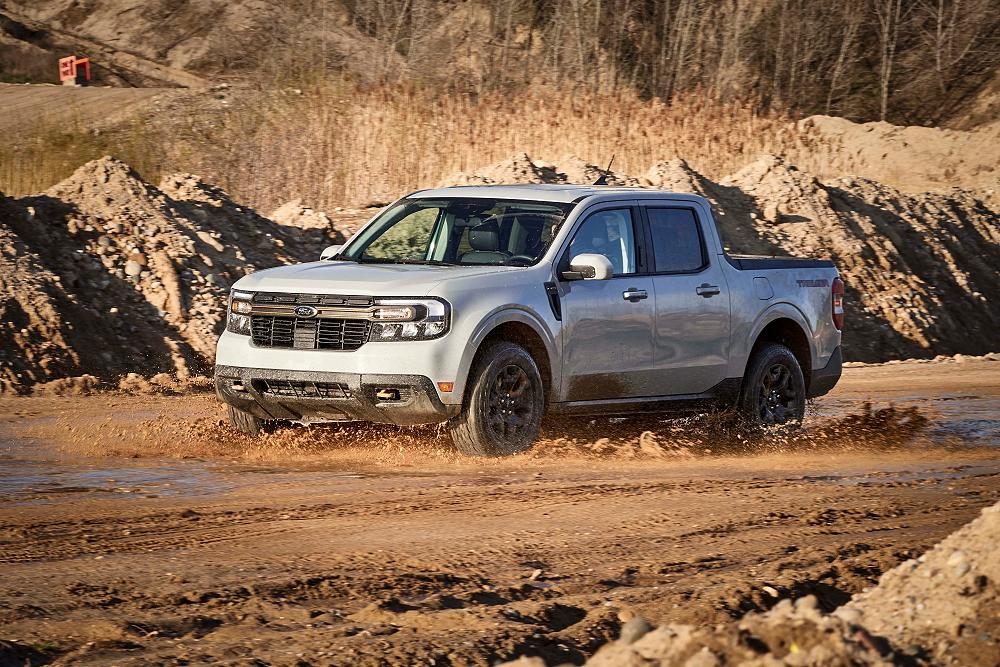
 Ford Maverick AWD vs 4WD Lock: A Quick Overview
The Ford Maverick uses an electronically controlled all-wheel drive (AWD) system designed to automatically improve traction when road or surface conditions demand it. Most of the time, the system operates without any driver input. On FX4 Off-Road and Tremor models, additional features allow the driver to intentionally lock the drivetrain for improved performance in off-road conditions.
AWD vs 4WD Lock: What’s the Difference?
Understanding the difference between AWD and 4WD Lock is key to using your Maverick correctly.
- AWD (Normal Operation) – Automatically sends power to the rear wheels when needed. Safe for use on all road surfaces, including dry pavement.
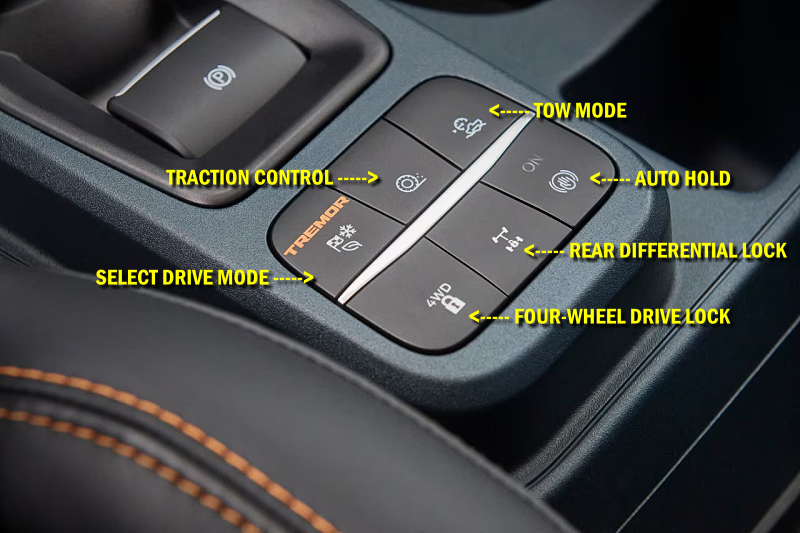
- 4WD Lock (FX4 Off-Road and Tremor) – Prevents the front and rear axles from disconnecting. Intended for loose or uneven surfaces only.
In everyday driving, you should rely on AWD. 4WD Lock should only be used when additional traction is required and the surface allows tire slip.
When Should You Use 4WD Lock?

4WD Lock Button
You should consider engaging 4WD Lock when driving on:
- Loose dirt or gravel
- Mud or rutted trails
- Sand
- Uneven off-road terrain
Do not use 4WD Lock on dry pavement or hard-packed surfaces. Doing so can cause driveline bind, increased tire wear, noise, and potential drivetrain damage.
Recommended Drive Modes at a Glance
Drive Mode Control adjusts how AWD, traction control, and drivetrain systems behave. Choosing the correct mode is just as important as knowing when to lock the drivetrain.
| Driving Condition | Recommended Drive Mode | Drivetrain Behavior |
|---|---|---|
| Dry pavement | Normal | AWD engages automatically only when needed |
| Rain, snow, ice | Slippery | Optimized AWD engagement and reduced wheel spin |
| Loose dirt, uneven trails | Off-Road (FX4 / Tremor) | 4WD Lock active by default |
| Mud or deep ruts | Mud/Ruts | AWD tuned for momentum and wheel slip |
| Soft, dry sand | Sand | Sustained AWD engagement for flotation |
Mode Symbols

Drive Mode Button – Offroad

Drive Mode Button – Tremor / Lobo
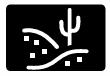
Sand Mode
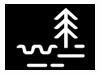
Mud / Ruts

Slippery
Want the Details?
The sections below take a deeper look at how the Maverick’s AWD system works, how Drive Mode Control changes drivetrain behavior, and how features like 4WD Lock and the rear electronic locking differential operate.
If you just want quick guidance, the overview above covers what most owners need to know. If you want to understand why the system behaves the way it does, keep reading.
How All-Wheel Drive Works on the Ford Maverick
The Ford Maverick uses an electronically controlled all-wheel drive (AWD) system designed to automatically adjust power delivery between the front and rear wheels. Unlike traditional truck-based four-wheel drive systems, Maverick AWD requires no driver input under normal operation and is always monitoring traction and handling conditions. Ford describes two distinct AWD operating configurations in the Maverick owner’s manual:
- AWD (Excluding FX4 Off-Road and Tremor)
- AWD with Four-Wheel Drive Lock and Rear Electronic Locking Differential (FX4 Off-Road and Tremor)
Understanding which system your Maverick has — and how to use it correctly — is critical to performance, durability, and warranty coverage.
How AWD Works (Excluding FX4 Off-Road and Tremor)
On standard AWD-equipped Mavericks, the system is designed to continuously monitor and adjust power delivery to the front and rear wheels to optimize traction and handling. Under most driving conditions, the vehicle primarily drives the front wheels. When wheel slip is detected — or when the system predicts slip may occur — the AWD system automatically sends torque to the rear wheels. No driver action is required. The system engages and disengages as needed.
Important Usage Limitations
According to Ford, AWD Mavericks without FX4 or Tremor are not intended for off-road use.
These vehicles are designed for:
- Rain and wet pavement
- Snow and icy roads
- Gravel roads
- Relatively level, obstruction-free surfaces
Operating the vehicle in terrain beyond these conditions can place excessive stress on drivetrain components. Damage caused by misuse may not be covered under warranty.
How AWD Works on FX4 Off-Road and Tremor Models
FX4 Off-Road and Tremor Mavericks use the same automatic AWD foundation but add driver-selectable traction features designed for low-traction and off-road environments. Like standard AWD models, the system automatically engages when needed and does not require constant driver input. However, these trims include additional hardware and software that allow the driver to intentionally prevent axle disengagement when conditions require it.
Four-Wheel Drive Lock (If Equipped)
The Four-Wheel Drive Lock feature increases performance by preventing the front and rear axles from disconnecting. When activated, the system maintains continuous power delivery to both axles, instead of allowing the rear axle to disengage during steady-state driving. You can activate or deactivate 4WD Lock while driving by pressing the button on the drive mode control.
Important Warnings
- The 4WD Lock is not intended for use on dry pavement
- Using it on dry pavement can cause excessive noise
- It can accelerate tire and drivetrain wear
When active, the 4WD Lock indicator illuminates in the instrument cluster. In standby mode, the indicator appears gray; when active, it changes color.
Rear Electronic Locking Differential (If Equipped)

Locking Differential Button
The rear electronic locking differential provides additional traction by forcing both rear wheels to rotate together. This feature is intended for situations where one rear wheel may lose traction, such as:
- Mud
- Sand
- Rocks
- Steep or uneven terrain
- Recovering the vehicle when stuck
The rear differential lock can be engaged or disengaged while moving, as long as vehicle speed is within the allowable operating range. If vehicle speed exceeds the system limit, the feature automatically disengages and will re-engage once speed is reduced.
Rear Electronic Locking Differential Engagement Speed and Availability
The rear electronic locking differential can only operate within specific speed limits. If vehicle speed exceeds the allowed threshold, the system automatically disengages to protect drivetrain components.
| Drive Mode | Maximum Engagement Speed | Automatic Disengagement |
|---|---|---|
| Normal / Slippery / Mud-Ruts / Sand | Up to 15 mph | Disengages above 15 mph |
| Off-Road (FX4 Off-Road / Tremor) | Up to 30 mph | Disengages above 30 mph |
Once vehicle speed drops back below the engagement threshold, the rear electronic locking differential can re-engage automatically.
Dry Pavement Warning
Ford explicitly states that the rear electronic locking differential is for off-road use only. Using it on dry pavement can cause:
- Excessive noise
- Increased tire wear
- Increased drivetrain stress
Damage caused by improper use may not be covered under warranty. When active, the rear differential lock indicator illuminates in the instrument cluster. As with 4WD Lock, the indicator appears gray in standby and changes color when active.
Rear Electronic Locking Differential Engagement Limits
The availability and engagement speed of the rear electronic locking differential depend on the selected drive mode. Ford provides a table in the owner’s manual showing:
- Which drive modes allow rear differential locking
- The maximum speed at which the feature can remain engaged
- When the system will automatically disengage
Drivers should always consult the owner’s manual for the exact engagement limits for their specific model year and trim.
AWD vs Traditional 4WD: What Maverick Owners Should Know
- The Maverick does not use a traditional transfer case
- There is no low-range (4L)
- AWD engagement is automatic and electronically controlled
- FX4 and Tremor models add driver-selectable locking features
This design prioritizes fuel economy, ease of use, and real-world traction rather than extreme off-road capability.
Drive Mode Control and How It Affects AWD and 4WD Operation
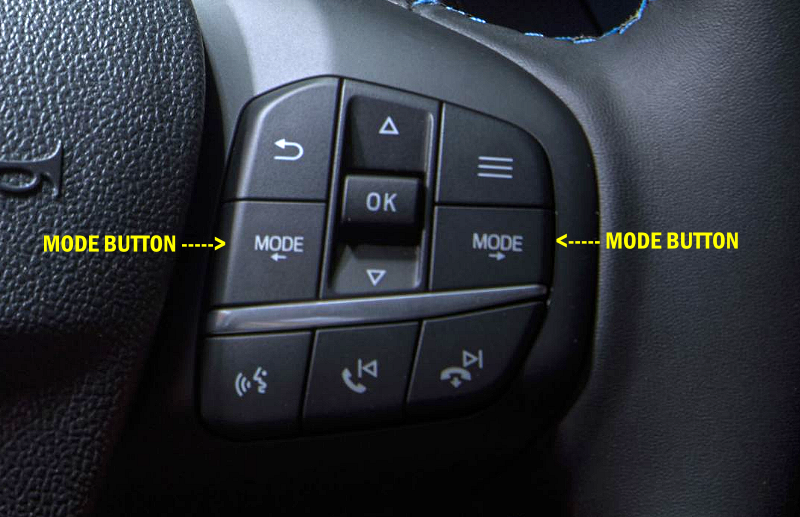
Ford Maverick models equipped with all-wheel drive use Drive Mode Control to coordinate multiple vehicle systems through a single interface. This system adjusts drivetrain behavior, throttle response, transmission shifting, traction control, and stability control to match different driving conditions.
Drive Mode Control plays a critical role in how AWD, Four-Wheel Drive Lock, and the rear electronic locking differential operate.
What Is Drive Mode Control?
Drive Mode Control connects multiple vehicle systems to provide enhanced vehicle control and driving dynamics for different scenarios, terrains,
weather conditions, and road surfaces.
When a drive mode is selected, the vehicle automatically alters electrical and mechanical systems to a predetermined configuration. The specific systems affected depend on the selected mode and vehicle equipment.
How Drive Mode Control Works
When you select a drive mode, the Maverick adjusts:
- Throttle (accelerator pedal) responsiveness
- Transmission shift timing
- All-wheel drive engagement strategy
- Traction control thresholds
- Stability control behavior
- Auto Start-Stop operation (when equipped)
These changes happen automatically and remain active until another drive mode is selected.
Selecting a Drive Mode
To select a drive mode:
- Press one of the drive mode buttons located on the steering wheel.
- The first press activates the drive mode selection menu in the instrument cluster.
- Subsequent presses cycle through the available drive modes.
Note: Drive mode changes may not be available when the ignition is off.
Drive Modes That Affect AWD and 4WD Operation
Off-Road Mode (FX4 Off-Road and Tremor Only)
Off-Road mode is designed for low-speed off-road environments where precise vehicle control and sustained traction are required.
When Off-Road mode is selected:
- Accelerator pedal response is reduced for better control
- Transmission upshifts are delayed to maintain low-speed torque
- Traction and stability controls allow increased wheel spin
- Wheel spin helps clear debris from tires to improve traction
- Auto Start-Stop may be disabled, depending on vehicle configuration
Important: Four-Wheel Drive Lock is the default drivetrain mode when Off-Road mode is active.
Use Off-Road mode for:
- Mud
- Sand
- Rough or uneven off-road terrain
Warning: This mode is for off-road use only. Do not use Off-Road mode on pavement or packed snow. Using this mode on hard surfaces can cause driveline bind, excessive wear, or drivetrain damage.
Slippery Mode
Slippery mode is designed to improve control on slick, low-traction surfaces.
When Slippery mode is selected:
- Throttle response is softened
- Transmission shift points are adjusted
- Traction and stability controls are optimized to reduce wheel spin
- AWD control is tuned to provide optimal traction on slippery surfaces
Use Slippery mode for:
- Snow-covered roads
- Icy conditions
- Wet pavement
- Firm surfaces covered with loose or slippery material
This is the preferred mode for winter driving on paved or hard-packed surfaces.
Mud/Ruts Mode (If Equipped)
Mud/Ruts mode is intended for off-road driving in muddy, rutted, or uneven terrain where maintaining momentum is critical.
When Mud/Ruts mode is selected:
- Lower gears are held longer to maintain momentum
- AWD and traction control are tuned for soft surfaces
- Braking is optimized for deformable terrain
- Stability control allows additional wheel slip for path correction
This mode may also help free the vehicle if it becomes stuck in deep snow or sand.
Warning: Using Mud/Ruts mode on dry, hard surfaces may cause vibration,
driveline bind, and excessive tire or drivetrain wear.
Sand Mode (If Equipped)
Sand mode is designed for off-road driving on soft, dry sand or deep sand conditions.
When Sand mode is selected:
- Lower gears are held longer to maintain momentum
- AWD engagement is optimized for soft, loose terrain
- Braking is adjusted for deformable surfaces
Use Sand mode for:
- Loose beach sand
- Dunes
- Deep, dry sand conditions
Warnings:
- Do not use Sand mode on dry pavement or hard surfaces
- Do not use Sand mode on firm, slippery surfaces such as snow- or ice-covered roads
- For firm, slippery surfaces, use Slippery mode instead
Why Drive Mode Selection Matters
Drive Mode Control does more than change throttle feel — it directly influences how and when AWD engages, whether 4WD Lock is applied, and how traction and stability systems respond.
Selecting the correct drive mode:
- Improves vehicle control
- Reduces unnecessary drivetrain stress
- Helps prevent premature component wear
- Ensures the vehicle operates within its intended design limits
Using the wrong mode for the surface can reduce performance
and may result in damage not covered by warranty.
Summary
- Maverick AWD automatically adjusts power to front and rear wheels
- Standard AWD models are intended for on-road and light-duty surfaces
- FX4 and Tremor models add 4WD Lock and rear differential locking
- Locking features should never be used on dry pavement
- Proper use protects drivetrain components and warranty coverage
Understanding how your Maverick’s AWD system is designed to operate will help you get the most traction, performance, and longevity from your truck.